
On first use, the Training Program will be selected. This is a 10-minute foot-pad program that is intended to help you get used to the sensation of EMS stimulation and learn how Revitive rocks at the right intensity level. You can also set your preferred stimulation intensity level at the end of the program to enable the Auto Ramp-Up feature on your next therapy session. Once the Training program is complete, your main therapy can begin.
Please note that if you switch away from this app for any reason, simply reopen the app by tapping the icon on your phone.
It is important that you are well hydrated. We recommend that you apply a moisturiser to the soles of the feet to help hydrate the skin and improve the delivery of electrical stimulation. We also recommend drinking a glass of water before using Revitive.
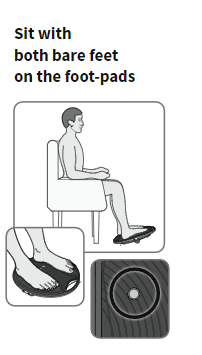
a Get into a comfortable seated position.
For best results sit with your knees at a 90-degree angle (right angle).
Place Revitive on the floor in front of you.Revitive is designed to be used while seated.
Never stand on Revitive.
Remove all footwear, including socks/stockings and then place both feet on the foot-pads, ensuring they cover the metal hydration sensors.
bTap at the bottom of the screen.
Read and tap through the Usage Tips to reach the Controller screen.

Introducing the Controller Screen

c Starting stimulation
Tap to start a program, responding to any on screen questions.

d Adjusting the stimulation intensity
Tap the large green - or + buttons to manually decrease or increase the intensity in single units to a comfortable level. The intensity level is indicated by the coloured intensity level indicator on the arc and the large number inside the arc.
To quickly decrease or increase the intensity, tap and hold - or +.
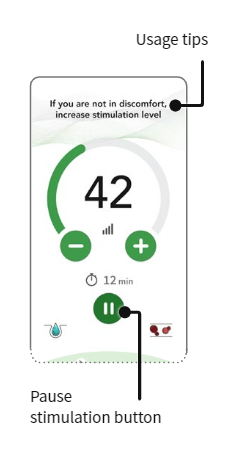
When using the foot-pads you will be guided to the right intensity by indications and messages that appear on the screen. The intensity arc will also turn from orange to green when sufficient rocking movement is achieved.
If at any point during your therapy session, you stop rocking, a sound/ vibration will alert you. To start rocking again, increase the intensity level by tapping the + button.
Note: Very dry feet may cause Revitive to auto-pause, and stimulation will not be possible until the soles of your feet are hydrated. If this happens, apply some moisturiser to the soles of your feet.When using the Electrode Pads use at an intensity that provides you with strong but comfortable muscle contractions.
If you feel pain or discomfort: Lower the intensity of the foot/electrode pads using the intensity controls on the controller screen or the device.
e Pausing and resuming stimulation
Tap pause or remove your feet from the foot-pads.
When paused, the time display blinks in the app and on Revitive.
During a pause, you may reduce but not increase the intensity level.
Note that if paused for 10 minutes, the stimulation session ends and Revitive powers off. You will hear three beeps when your Revitive switches off.
To resume your therapy session, place both feet back on the pads and tap play in the app to (or tap the button on Revitive).You can tap stop to stop the stimulation session.

f Adjusting the duration of your program
The duration of the scheduled program is set automatically. The remaining stimulation time begins to count down in minutes as the program runs.
You can adjust the time at any point during a therapy session by tapping the ‘remaining time’ indication to display the timer buttons.
Tap the + grey - or buttons to manually decrease or increase the duration of your scheduled program.

g At the end of the session, the app will ask if you would like Revitive to remember the intensity level you reached for your next session using the Auto Ramp-Up feature.
About Auto Ramp-Up: Enabling Auto Ramp-Up aims to simplify use of your Revitive. When enabled Revitive will automatically increase the intensity level to your preferred level when you tap the Start button. You will not need to manually increase the intensity.

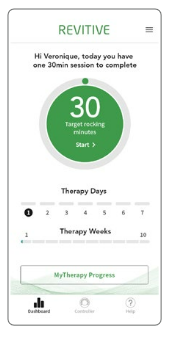
h The app will switch to the Dashboard screen where you can view your suggested Therapy Plan.
You can complete your suggested Therapy sessions whenever it suits you. If you are unable to complete the session in one sitting you can stop and start throughout the day. Revitive will track how many minutes you have completed.
The device switches off after 10 minutes unless you revisit the Controller screen to start another program.
i The Programs are automatically selected as part of your suggested Therapy Plan. The program name is always displayed at the bottom of the Controller screen.
You can manually choose your Program by tapping the Program name when no stimulation is running.

Comments
Article is closed for comments.